

Do I need an interface?
The ability to make production music at home has been made so much easier in the last 20 years with the very broad commercialisation of equipment and wide availability of software. But at it’s core – any kind of music production is ‘audio engineering’ and that, by definition, is difficult. So if you’re still trying to figure it out – don’t worry! It’s complicated and we’re here to try and make it a little easier. The question of ‘do I need an audio interface’ pops up every so often on the forums. The usual answers “yes”, and “if you want to record, you will” appear, but even those can be confusing answers because there’s no context. Because you can use your DAW without an audio interface and you can record without an audio interface, but you’re seriously limited in what you can do – might that actually might be ok!! So let’s look at Audio Interfaces for a second.What is an audio interface?
 To over simplify – an audio interface does 3 main things:
- Provides Microphone, Jack and Instrument Inputs
- Provides Audio outputs
- Converts your analog audio to digital data
What can I do in Pro Tools without an Audio Interface?
Not having an audio interface doesn’t make using Pro Tools impossible. You can still: • Play back anything on your timeline using your computers internal soundcard. • Arrange samples or Loops on your timeline, and hear them from your computer’s internal soundcard • Arrange MIDI using a mouse • Play back MIDI and hear it from your computer’s internal soundcard. • Record MIDI using a USB MIDI controller (basically a keyboard)Playback without an audio interface
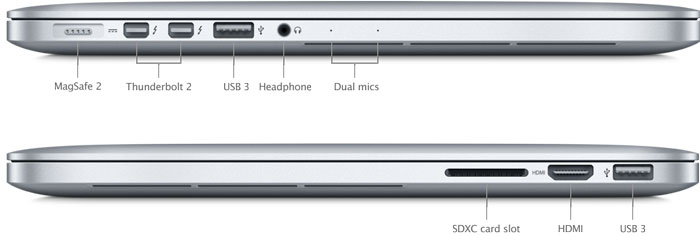 The image above shows a typical MacBook Pro with a headphone port. The Mac’s internal soundcard – called “BUILT-IN OUTPUT” in Pro Tools Playback Engine – will pump the sound either out through the Mac’s stereo speakers, or to the headphone port when you plug in headphones.
You could also plug in speakers, using a 3.5mm -> RCA cable for speakers (or an amp) with RCA inputs or a 3.5mm -> 1/4″ Jack Plug cable to plug into any studio monitors that have a 1.4″ TRS Jack input, which is most of them.
So you have three playback options here: 1. the computer’s built in speakers (which provide no bass, so this is essentially useless); 2. head or earphones; 3. or plugging your computer into a speaker system.
Monitoring your playback this was will allow you to playback anything on your time line, arrange loops and arrange MIDI with a mouse.
The image above shows a typical MacBook Pro with a headphone port. The Mac’s internal soundcard – called “BUILT-IN OUTPUT” in Pro Tools Playback Engine – will pump the sound either out through the Mac’s stereo speakers, or to the headphone port when you plug in headphones.
You could also plug in speakers, using a 3.5mm -> RCA cable for speakers (or an amp) with RCA inputs or a 3.5mm -> 1/4″ Jack Plug cable to plug into any studio monitors that have a 1.4″ TRS Jack input, which is most of them.
So you have three playback options here: 1. the computer’s built in speakers (which provide no bass, so this is essentially useless); 2. head or earphones; 3. or plugging your computer into a speaker system.
Monitoring your playback this was will allow you to playback anything on your time line, arrange loops and arrange MIDI with a mouse.
Recording MIDI
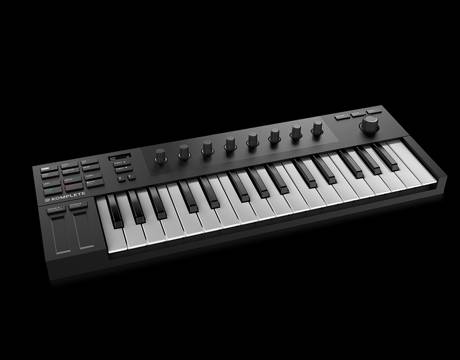 Using the MIDI language, you can ‘programme’ your performance into your computer using a USB keyboard such as Native Instruments’ M32 controller keyboard. These keyboards don’t transmit any noise, sounds or music – just MIDI performance data which you’ll capture with MIDI or Instrument Tracks in Pro Tools.
The MIDI data that you play and capture will trigger the sounds in your Pro Tools instruments, and this is what you’d hear playing back through your sound card.
Using the MIDI language, you can ‘programme’ your performance into your computer using a USB keyboard such as Native Instruments’ M32 controller keyboard. These keyboards don’t transmit any noise, sounds or music – just MIDI performance data which you’ll capture with MIDI or Instrument Tracks in Pro Tools.
The MIDI data that you play and capture will trigger the sounds in your Pro Tools instruments, and this is what you’d hear playing back through your sound card.